Moving your application load balancer infrastructure from on-premises hardware to Google Cloud Load Balancing delivers real advantages: elastic scalability, lower operational overhead, and deep integration with the broader Google Cloud ecosystem. The question most teams face isn't whether to migrate, but how to handle the load balancer configurations they've accumulated over the years.
Those configurations often encode years of business-critical traffic logic. The encouraging reality is that virtually all of that functionality can be preserved in the migration — and in many cases, the process is an opportunity to modernize and simplify how your traffic management works.
This guide walks through a practical framework for migrating to Google Cloud's Application Load Balancer, covering both its built-in declarative configuration options and the more powerful, event-driven Service Extensions edge compute capability for complex custom logic.
A phased approach to migration
Moving from an imperative, script-based system to a cloud-native, declarative model requires structure. A four-phase approach keeps the process manageable and reduces risk.
Phase 1: Discovery and mapping
Before touching any configuration, you need a clear picture of what you're working with. Audit your existing load balancer rules and document the intent behind each one. Is a given rule handling a basic HTTP-to-HTTPS redirect? Manipulating request headers? Enforcing custom authentication logic? The answers determine the migration path.
Most configurations fall into two broad categories:
-
Common patterns: Logic that applies to most web applications — redirects, URL rewrites, basic header manipulation, and IP-based access control lists (ACLs).
-
Bespoke business logic: Application-specific rules such as custom token authentication, advanced header extraction and replacement, dynamic backend selection based on HTTP attributes, or response body manipulation.
Phase 2: Choose your Google Cloud equivalent
With your rules categorized, the next step is mapping each one to the right Google Cloud feature. This isn't a one-to-one substitution — it's a deliberate architectural choice.
Option 1: The declarative path (for approximately 80% of rules)
For the bulk of common traffic patterns, the Application Load Balancer's built-in declarative features are the right tool. Rather than maintaining scripts, you define desired state in configuration files — making your setup easier to manage, version-control, and scale.
Key mappings from common patterns to declarative features:
-
Redirects/rewrites → Application Load Balancer URL maps
-
ACLs/throttling → Google Cloud Armor security policies
-
Session persistence → backend service configuration
Option 2: The programmatic path (for complex, bespoke rules)
When declarative options aren't sufficient, Service Extensions fills the gap. This edge compute capability lets you inject custom code — written in Rust, C++, or Go — directly into the load balancer's data path, giving you fine-grained control within a modern, managed, high-performance framework.
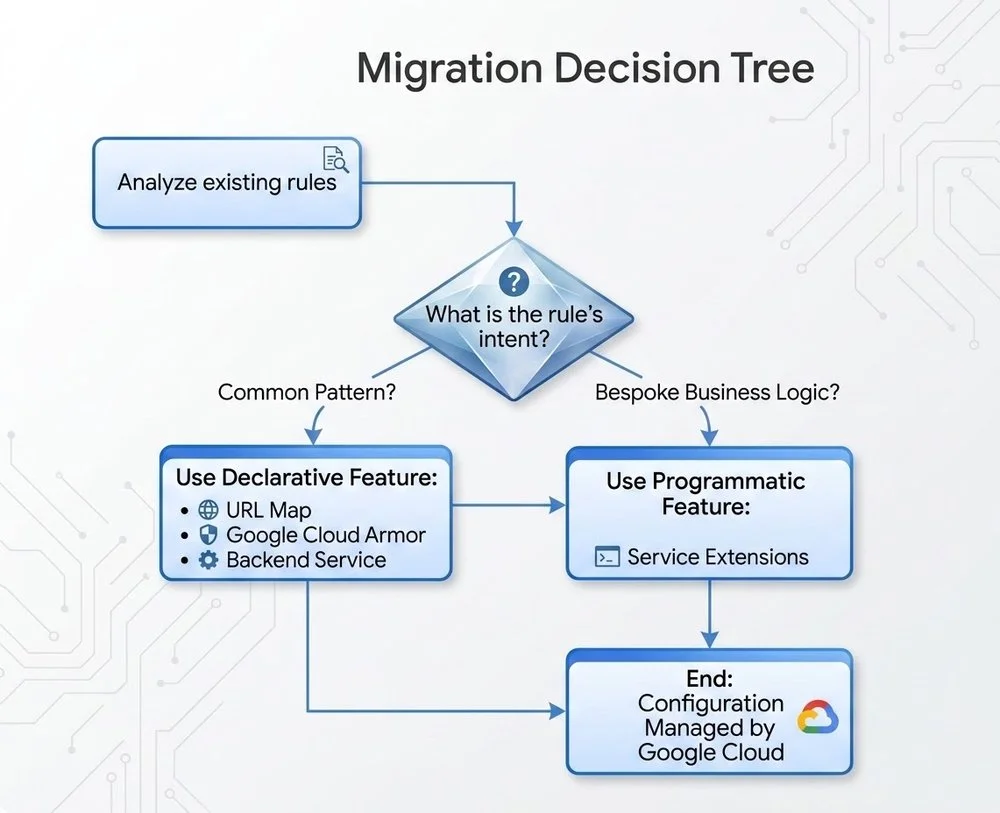
This flowchart helps you decide the appropriate Google Cloud feature for each configuration
Phase 3: Test and validate
With your feature mapping in place, deploy the new Application Load Balancer configuration in a staging environment that closely mirrors production. Test all application functionality thoroughly, with particular focus on migrated logic. Use a combination of automated tests and manual QA to verify that redirects behave correctly, security policies enforce as expected, and any custom Service Extensions logic produces the right outcomes.
Phase 4: Phased cutover (canary deployment)
Avoid switching all traffic at once. Instead, start by routing a small percentage — 5 to 10% — of production traffic to the new Google Cloud load balancer. Monitor key metrics closely during this initial period: latency, error rates, and overall application performance. As confidence grows, incrementally increase the traffic share routed to the Application Load Balancer. Throughout the cutover, maintain a clear rollback plan so you can revert to the legacy infrastructure quickly if a critical issue surfaces.
Best practices for a smooth migration
-
Analyze first, migrate second: A rigorous audit of your existing configurations is the single most important step. Don't carry forward logic that's no longer serving a purpose.
-
Default to declarative: Reach for Google Cloud's managed, declarative features — URL Maps, Cloud Armor — before anything else. They're simpler to operate, scale without effort, and demand less ongoing maintenance.
-
Use Service Extensions strategically: Reserve Service Extensions for logic that genuinely can't be expressed through declarative configuration — don't use it as a default.
-
Monitor everything: Keep visibility across both your legacy and new load balancers throughout the migration. Track traffic volume, latency, and error rates continuously so you can catch and address issues before they escalate.
-
Train your team: Invest in familiarizing your team with Cloud Load Balancing concepts. Teams that understand the platform operate it more effectively and troubleshoot issues faster.
Migrating from on-premises load balancer infrastructure is more than a technical exercise — it's a chance to rethink how your application delivers traffic at scale. By carefully mapping your existing rules to either declarative Application Load Balancer features or programmatic Service Extensions, you can arrive at an infrastructure that's more scalable, resilient, and cost-efficient than what you're replacing.
To get started, review the Application Load Balancer and Service Extensions documentation to identify the right design for your application. For guidance on more complex scenarios, reach out to your Google Cloud team.