A common challenge facing Google Cloud customers centers on balancing generative AI costs against performance requirements. The question isn't simply about minimizing expenses—it's about architecting the right combination of services that matches your specific usage patterns.
This guide examines Google Cloud's generative AI infrastructure options, helping you navigate the tradeoffs between cost efficiency and performance. We'll begin with foundational pay-as-you-go models before exploring specialized options for building a cost-effective gen AI architecture.
Pay-as-You-Go foundations
Google Cloud's standard PayGo offerings deliver flexibility for many workloads. Understanding the underlying performance and availability mechanisms is essential for optimization.
Dynamic Shared Quota (DSQ)
The PayGo environment uses Dynamic Shared Quota to allocate GenAI capacity intelligently across customers, rather than imposing rigid per-customer limits.
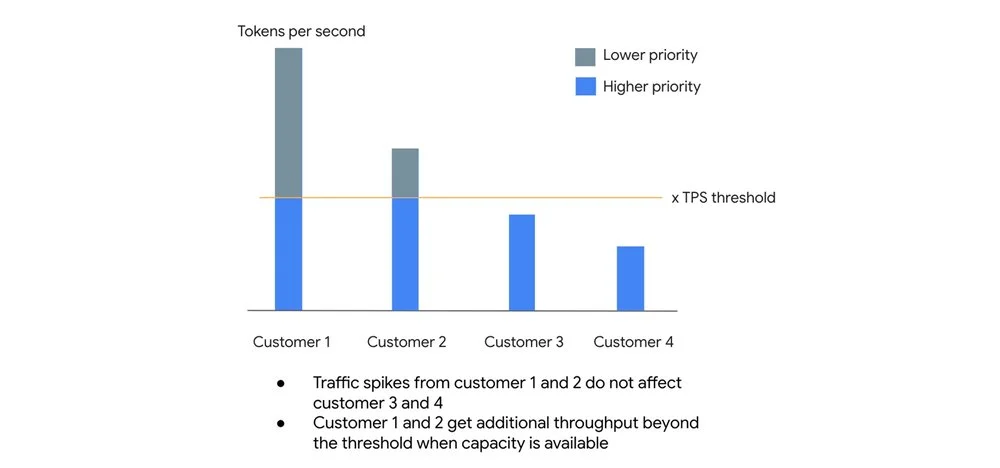
The system operates on two lanes:
- High-priority lane: Requests within your default Tokens Per Second (TPS) threshold receive priority treatment with a 99.5% SLO target.
- Best-effort lane: Traffic exceeding your TPS threshold isn't rejected outright. Instead, these requests receive lower priority and are processed when spare capacity exists.
This architecture prevents one customer's traffic spikes from degrading baseline performance for others, while allowing opportunistic bursting when system capacity permits.
Usage tiers
Google Cloud automatically assigns organizations to usage tiers based on rolling 30-day spend on eligible Vertex AI services. Higher tiers unlock increased guaranteed Tokens Per Minute (TPM) limits.
Current tier structure for popular model families:
Important: For current models and thresholds, consult the documentation
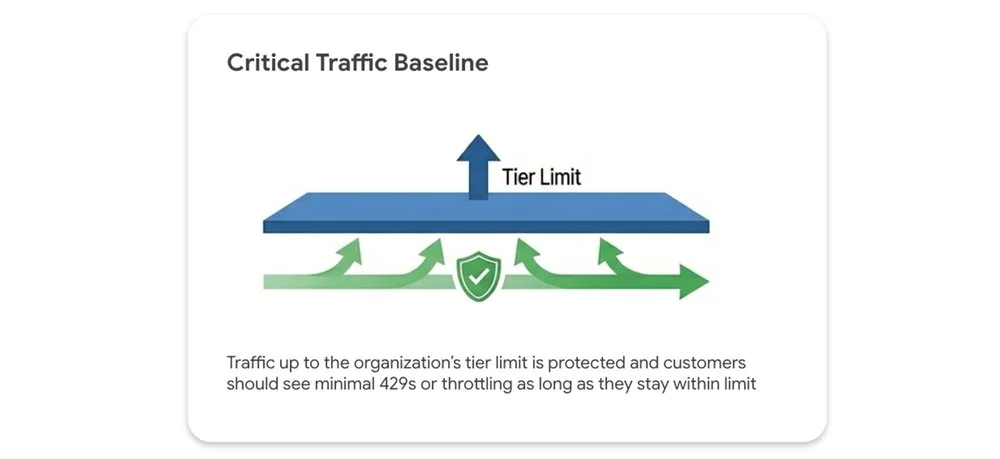
Your tier limit represents a performance floor, not a ceiling.
-
Critical traffic: Traffic within your tier limit receives protection, with minimal 429 (resource exhausted) errors expected.
-
Opportunistic bursting: Traffic exceeding tier limits can still utilize spare system capacity on a best-effort basis. Fair-share throttling applies only when the entire system experiences heavy load. Performance isn't artificially capped when idle capacity exists.
Priority PayGo
For workloads with unpredictable spikes that can't tolerate 429 errors but don't warrant fixed capacity commitments, Priority PayGo bridges the gap between PayGo flexibility and high availability requirements.
This premium option allows you to tag specific API requests for elevated priority treatment.
Important: Priority PayGo is currently available only for the global endpoint. Regional endpoint support may be added in future releases.
Implementation is straightforward—simply add a header to your API call. No signup or commitment required.
curl -X POST \
 -H "Authorization: Bearer $(gcloud auth print-access-token)" \
 -H "Content-Type: application/json" \
 -H "X-Vertex-AI-LLM-Shared-Request-Type: priority" \
 https://aiplatform.googleapis.com/...
Keep the ramp limit in mind. Ramping up priority requests too aggressively can trigger downgrades to standard priority when capacity is tight. A gradual ramp-up prevents downgrading and maintains consistent performance.
For example:
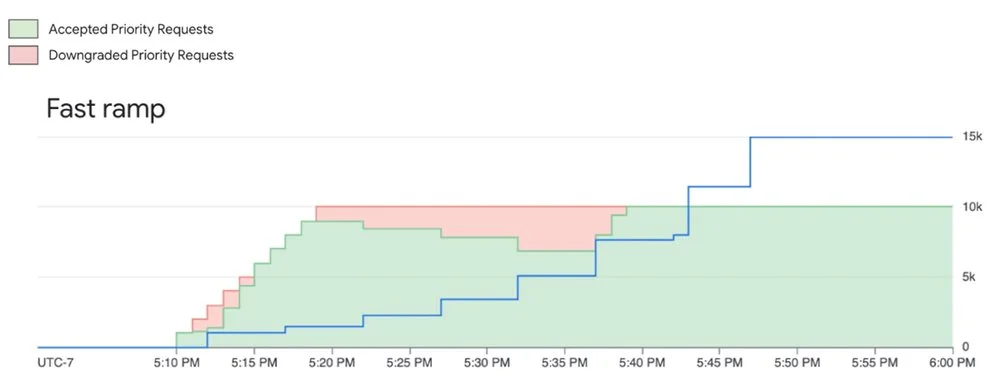
System tries to serve priority requests even when they are above the ramp limit, however they are subject to downgrading (not throttling) when capacity is constrained
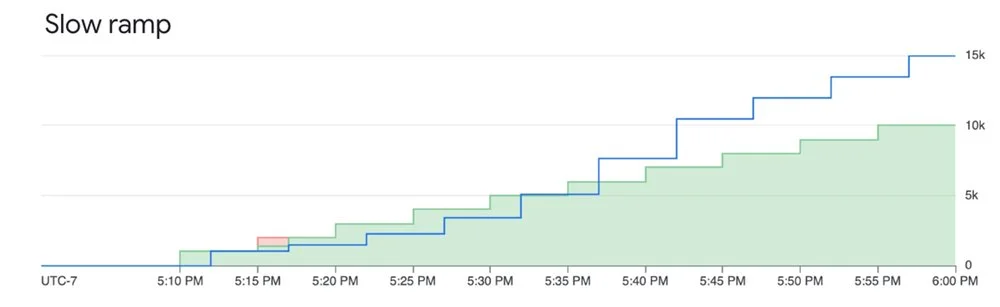
Ramping priority requests within the limit mitigates downgrading and ensures good experience
You can monitor your Priority PayGo usage by following this documentation.
For the uncompromising workload: Provisioned Throughput (PT)
When your gen AI workload is business-critical and demands an explicit availability guarantee, Provisioned Throughput is the answer.
With PT, you reserve dedicated model processing capacity for a fixed monthly cost. This is the only option that includes an availability SLA. While standard PayGo offers an uptime SLA (the model is operational), PT provides an availability SLA (your requests will be processed).
The distinction lies in how "error rate" is defined: the number of valid requests that return HTTP 5XX with "Internal Error" divided by total valid requests during the measurement period (minimum 2,000 valid requests required).
Standard PayGo returns 429 errors for "Resource exhausted" scenarios, which don't count toward the error rate. With Provisioned Throughput, when you stay within your purchased capacity, errors that would otherwise be 429s are returned as 5XX and count toward the SLA error rate. This is what differentiates PT's availability guarantee from PayGo's uptime guarantee.
Provisioned Throughput is ideal for:
- Large, predictable production workloads
- Applications with strict performance requirements where throttling isn't acceptable
Fine-grained control over your PT requests
By default, usage above your PT allocation automatically spills over to PayGo. You can control this behavior at the request level using HTTP headers:
Prevent overages: To ensure you never exceed your PT commitment and reject excess requests, add the dedicated header. This enforces strict budget control.
{"X-Vertex-AI-LLM-Request-Type": "dedicated"}Bypass PT on-demand: To intentionally route a lower-priority request to the PayGo pool despite having a PT allocation, use the shared header. This is useful for experiments or non-critical jobs that shouldn't consume reserved capacity.
{"X-Vertex-AI-LLM-Request-Type": "shared"}Monitoring your investment
Track your Provisioned Throughput usage through Cloud Monitoring metrics on the aiplatform.googleapis.com/PublisherModel resource. Key metrics include:
/dedicated_gsu_limit: Your dedicated limit in Generative Scale Units (GSUs)/consumed_token_throughput: Actual throughput usage, accounting for the model's burndown rate/dedicated_token_limit: Your dedicated limit measured in tokens per second
These metrics help you verify you're getting value from your commitment and optimize capacity over time. Learn more about PT on Vertex AI in our guide here.
Building your recipe: Combining options for optimal results
Consider a workload with a predictable daily baseline, expected peaks, and occasional unexpected spikes. The optimal approach combines:
- Provisioned Throughput: Cover your predictable, mission-critical baseload with an availability SLA for core application traffic
- Priority PayGo: Handle predictable peaks above your PT commitment or important but less frequent traffic, providing cost-effective insurance against 429 errors
- Standard PayGo (within tier limit): Foundation for general, non-critical traffic that fits within your organization's usage tier
- Standard PayGo (opportunistic bursting): For non-critical, latency-insensitive jobs like batch processing where occasional throttling won't impact core user experience
By understanding and combining these tools, you can optimize your GenAI strategy for the right balance of performance, availability, and cost.
Extra bonus: Batch API and Flex PayGo
Not every LLM request needs sub-second time-to-first-token (TTFT). Real-time chat requires low latency, but classifying millions of support tickets, running evaluations, or generating daily reports doesn't. The Gemini Batch API handles these asynchronous workloads efficiently. Bundle requests into a single file and submit it for processing during off-peak windows or when idle capacity is available. The target turnaround is 24 hours, though it's typically faster. By trading immediate execution for asynchronous processing, you get a 50% discount on standard token costs.
While Batch handles offline workloads, live apps still need real-time computation. Flex PayGo offers a 50% discount compared to Standard PayGo for non-critical workloads that can accommodate response times up to 30 minutes. You can seamlessly transition between Provisioned Throughput, Standard PayGo, and Flex PayGo with minimal code changes. Ideal use cases include:
- Offline analysis of text and multimodal files
- Model quality evaluation and benchmarking
- Data annotation and labeling
- Automated product catalog generation
Get started
- Explore the Models in Vertex AI: Discover Google's first-party models and over 100 open-source models available in the Model Garden
- Dive deeper into the documentation: For technical details, thresholds, and code samples, consult the official Vertex AI documentation
- Review pricing details: Get a detailed breakdown of token costs, Provisioned Throughput pricing, and discounts for Batch and Flex APIs on the Vertex AI pricing page