The concept of Generative UI Design is emerging as a potential paradigm shift in how we approach web interfaces. Products like Figma Sites already hint at this future, promising websites generated on-the-fly through simple prompts.
Setting aside the obvious problems of releasing immature technology as production-ready, what fascinates me is the research exploring Generative AI (GenAI) for personalized interface creation. This approach fundamentally inverts traditional UI design. Instead of anticipating user needs upfront, GenAI observes those needs and generates custom-tailored interfaces in real time. Every user interaction becomes unique—no two experiences are identical.
It's a radical concept. I'm not here to advocate for or against Generative UI Design (GenUI for short)—just collecting notes as I learn more about it.
Defining GenUI
Google Research (PDF):
Generative UI is a new modality where the AI model generates not only content, but the entire user experience. This results in custom interactive experiences, including rich formatting, images, maps, audio and even simulations and games, in response to any prompt (instead of the widely adopted "walls-of-text").
A generative UI (genUI) is a user interface that is dynamically generated in real time by artificial intelligence to provide an experience customized to fit the user's needs and context.
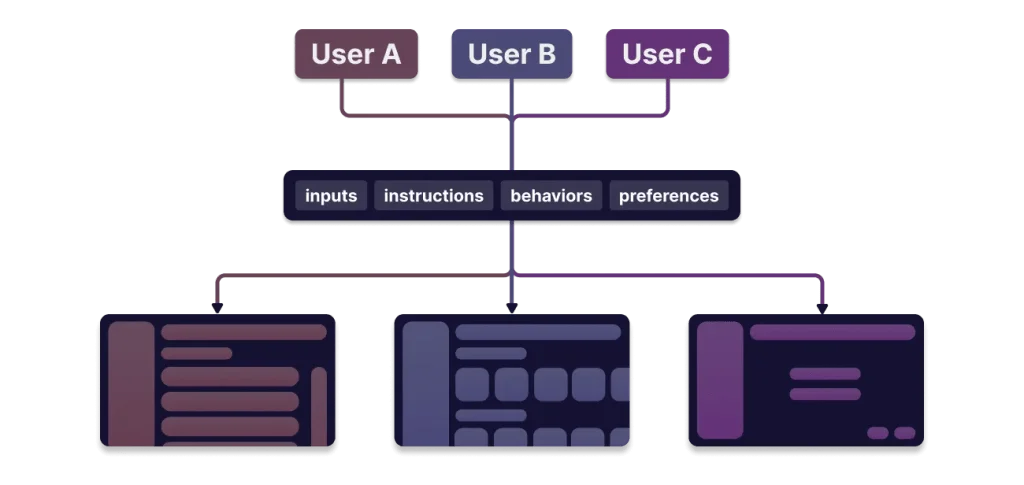
A Generative User Interface (GenUI) is an interface that adapts to, or processes, context such as inputs, instructions, behaviors, and preferences through the use of generative AI models (e.g. LLMs) in order to enhance the user experience.
Put simply, a GenUI interface displays different components, information, layouts, or styles, based on who's using it and what they need at that moment.
Generative vs. Predictive AI
AI isn't monolithic. It's typically split into two categories: predictive and generative.
| Predictive AI | Generative AI | |
|---|---|---|
| Inputs | Uses smaller, more targeted datasets as input data. (Smashing Magazine) | Trained on large datasets containing millions of sample content. (U.S. Congress, PDF) |
| Outputs | Forecasts future events and outcomes. (IBM) | New content, including audio, code, images, text, simulations, and videos. (McKinsey) |
| Examples | ChatGPT, Claude | Sora, Suno, Cursor |
GenAI creates new materials based on training data. GenUI specifically means generating user interfaces based on what the AI knows about the user.
Accessibility
What I'm discussing here extends beyond GenUI's strict definition of individually adaptive interfaces to include AI-generated website builders. These tools don't yet adapt to individual users, but the trajectory is clear.
My primary concern is whether GenUI can reliably create experiences that work for all users, regardless of visual, auditory, physical, or cognitive abilities. The variables are complex, and early results have been dismal.
Figma Sites is an easy target because they made the biggest commercial push into GenUI-based web development. After significant backlash, they responded by announcing updates and publishing accessibility guidance. But even these efforts have serious limitations that feel more like damage control than genuine solutions.
Other players have entered the space: WordPress, Vercel, Squarespace, Wix, GoDaddy, Lovable, and Reeady.
Some believe GenUI will not only produce accessible experiences but replace accessibility practitioners entirely. Jakob Nielsen made that claim in 2024, sparking fierce criticism from the accessibility community. Nielsen softened his stance a year later, though not by much.
I'm not qualified to prescribe best practices or predict the future of accessibility work. But when I look at Google's People + AI Guidebook, accessibility is conspicuously absent despite heavy emphasis on "human-centered" design.
Accessibility is trailing behind the hype. If GenUI is truly the future of web design, that needs to change.
Examples & Resources
Google maintains a repository of examples demonstrating how user input can generate various interfaces. Project Genie takes this further, creating "interactive worlds" that are "generated in real-time." I couldn't secure an invite, but you might have better luck.
Google also offers a GenUI SDK for Flutter apps. Connect to your LLM provider and start building adaptive interfaces.
Thesys is another adaptive GenUI platform. Copilot offers similar capabilities.
References
- Figma Sites
- "Do Not Publish Your Designs on the Web with Figma Sites…" by Adrian Roselli
- "Generative UI: LLMs are Effective UI Generators" – Google Research (PDF)
- "Generative UI and Outcome-Oriented Design" from Nielsen Norman Group
- "An Introduction to Generative UIs" via UX Collective
- "A Simple Guide To Retrieval Augmented Generation Language Models" by Joas Pambou
- "Generative Artificial Intelligence: Overview, Issues, and Considerations for Congress" – U.S. Congressional Research Service (PDF)
- "Generative AI vs. Predictive AI: What's the Difference?" from IBM
- "What Is Generative AI?" – McKinsey & Company
- "Introducing: Webbed Sites" by Heydon Pickering (video)
- "Publish Your Designs on the Web with Figma Sites" – Figma Blog
- "Figma Sites on Starter and Education" – Figma Release Notes
- "Improve the Accessibility of Your Site" from Figma Learn
- "Accessibility Has Failed: Try Generative UI = Individualized UX" by Jakob Nielsen
- "Hello AI Agents: Goodbye UI Design, RIP Accessibility" by Jakob Nielsen
- "The People + AI Guidebook" from Google PAIR
- Project Genie – Google Labs
- "Get Started with the GenUI SDK for Flutter" from Flutter documentation
Generative UI Notes originally published on CSS-Tricks. Subscribe to the newsletter for more.