Short and sweet — this issue covers light/dark favicons, @mixin, anchor-interpolated morphing, object-view-box, new web platform features, and more.
SVG favicons that respect the color scheme
There's a certain elegance to logos with ~50% lightness that hold up equally well on light and dark backgrounds — but not every brand has that luxury. Paweł Grzybek walks through how to implement SVG favicons that adapt to the user's color scheme preference. The technique works, but browser support is inconsistent, and there's an active push to get it standardized across the board. Worth reading if favicon polish is on your radar.
And while we're on the theme of toggles and color schemes, here's a delightful skeuomorphic egg-themed CSS toggle that surfaced last week. The timing feels almost intentional.
Skeuomorphic Egg Toggle Switch [HTML + CSS + JS] Organic mechanics. Complex box-shadow layering and border-radius manipulation. Tactile feedback through depth. Source code: freefrontend.com/code/skeuomo…
— FreeFrontend (@freefrontend.bsky.social) Mar 26, 2026 at 11:42
[image or embed]
Help the CSS WG shape @mixin
Native CSS mixins are inching closer to reality. Lea Verou shared a code snippet and is asking for community feedback on what feels intuitive — specifically around how width values cascade through nested elements when a mixin is applied. The CSS Working Group wants real developer input, so this is a rare opportunity to influence how the feature takes shape.
🚨 Want mixins in CSS? Help the CSS WG by telling us what feels natural to you! Look at the code in the screenshot. What resulting widths would *you* find least surprising for each of div, div > h2, div + p? Polls: ┣ Github: github.com/LeaVerou/blo… ┗ Mastodon: front-end.social/@leaverou/11…
— Lea Verou, PhD (@lea.verou.me) Mar 26, 2026 at 23:29
[image or embed]
Anchor-interpolated morphing tutorial
Chris Coyier has a great writeup on building an image gallery with popovers using AIM — Anchor-Interpolated Morphing. If that term is new to you, Adam Argyle introduced the concept back in January. It's not a standalone CSS feature but rather a technique: animating an element from its natural position to an anchor-defined target. The result is smooth, contextual motion that feels purposeful. Don't skip this one.
Also, remember Temani's demo from a few weeks back? Frontend Masters has now published a full tutorial for that one too.
Remember object-view-box? Me neither
CSS object-view-box lets you zoom, crop, and frame replaced elements — think images — in a way that mirrors how SVG's viewBox attribute works. Chrome shipped it back in August 2022, and then… silence. It's one of those features that quietly landed and never got its moment in the spotlight. Victor Ponamariov has revived the conversation with a Bluesky thread explaining how object-view-box actually works. Here's hoping Safari and Firefox pick it up soon.
Wouldn't it be great to have native image cropping in CSS? It actually exists: object-view-box.
— Victor (@vpon.me) Mar 24, 2026 at 16:15
[image or embed]
corner-shape for everyday UI elements
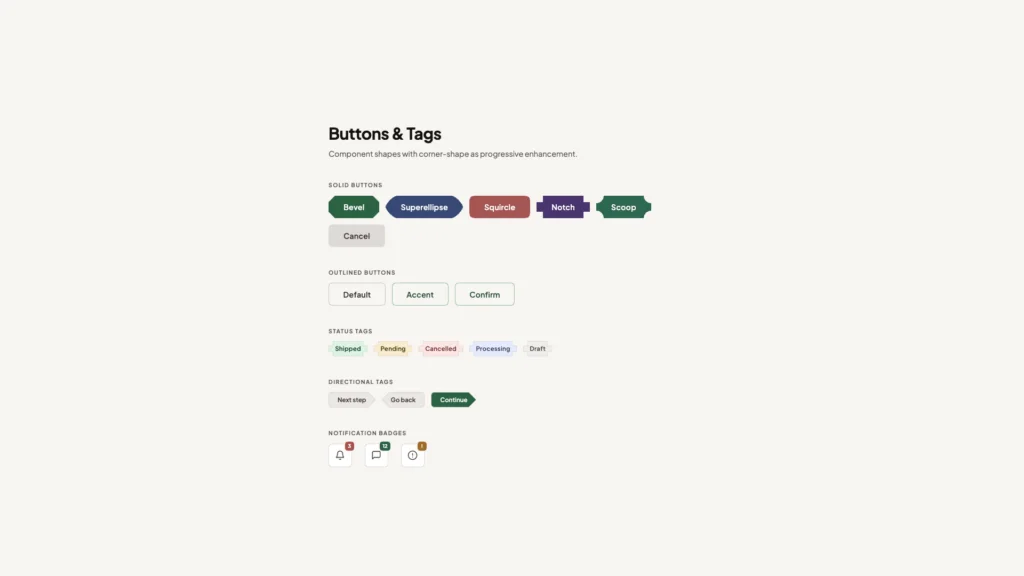
CSS corner-shape has been written about extensively — by us and the broader web dev community — even though it's currently Chrome-only. It's a genuinely fun property with a surprising range of expressive possibilities. What makes Brecht De Ruyte's corner-shape piece over at Smashing Magazine worth your time is its practical focus: rather than dwelling on the exotic, it explores how corner-shape can improve the everyday UI components you're already building.
The Layout Maestro
Ahmad Shadeed's course — The Layout Maestro — is focused on planning and building CSS layouts with modern techniques. It also bundles an extended trial of Polypane, the browser built specifically for web development, giving you a hands-on tool to practice alongside the lessons.

New web platform features
Firefox and Safari both shipped new features this cycle — none Baseline yet, but worth tracking:
- Firefox 149
popover=hint(also supported in Chrome)- Name-only containers (e.g.,
@container name { })
- Safari 26.4
- Name-only containers (same as above)
display: grid-lanesandflow-tolerance
- Safari TP 240
Bramus has also flagged that Chrome 148 will ship at-rule feature queries, and that both Chrome 148 and Firefox 150 will extend light-dark() support to background-image. And if you want a single place to keep tabs on all of this, BaseWatch is a new site dedicated to tracking Baseline status across CSS features.
What's !important #8: Light/Dark Favicons, @mixin, object-view-box, and More originally handwritten and published with love on CSS-Tricks. You should really get the newsletter as well.