Date range pickers are everywhere — booking flights, filtering analytics dashboards, scheduling meetings — yet they're one of those UI components that developers consistently over-engineer. The instinct is to reach for a JavaScript library, pull in a heavyweight dependency, and wire up dozens of event listeners. A recent deep-dive from CSS-Tricks challenges that assumption by demonstrating how CSS's underused :nth-child(n of selector) syntax can shoulder most of the selection logic, leaving JavaScript to handle only what it genuinely must.
The result is a functional, visually coherent date range picker that's lighter, more maintainable, and frankly more elegant than what most teams ship by default.
The CSS Feature Most Developers Haven't Touched
The :nth-child pseudo-selector has been a CSS staple for years, but its extended "n of selector" syntax is a different animal. Standard :nth-child counts position among all siblings — so .accent:nth-child(2) targets an .accent element only if it happens to be the second child of its parent, regardless of class. That's a subtle but frequently maddening distinction.
The "n of selector" form flips this logic. :nth-child(2 of .accent) first filters the sibling list to only .accent elements, then counts position within that filtered set. Think of it as "the second element that matches this selector" rather than "the second element, if it matches this selector." The difference is profound in practice.
Browser support arrived in Safari first, then spread to Chrome 111 and Firefox 113 — both released in 2023. That puts the feature at solid baseline support for most production environments today, though teams targeting older enterprise browsers should verify their specific requirements.
Building the Calendar Structure
The foundation is deliberately simple: an unordered list where day-name items (.day) and date items (.date) coexist as siblings. Each date item wraps a number and a hidden checkbox. CSS Grid handles the seven-column week layout in a single declaration:
display: grid;
grid-template-columns: repeat(7, 1fr);
That's the entire layout. No float hacks, no flexbox gymnastics, no hardcoded widths. The grid automatically positions days and dates across weeks because the item count drives the flow. It's a pattern worth bookmarking — calendar layouts that once required complex positioning now resolve in three lines.
The hidden checkboxes inside each .date element are doing double duty. They provide native browser state management (checked/unchecked) that CSS can directly query, which is exactly what makes the CSS selection logic possible downstream. This is an underused architectural pattern: lean on native form elements as state holders rather than managing state exclusively in JavaScript.
Where JavaScript Steps In — and Where CSS Takes Over
The implementation uses JavaScript for exactly one thing it must: toggling checkbox state. Browsers don't expose a pure-CSS mechanism for programmatically checking or unchecking inputs based on user interaction elsewhere, so a small event listener handles the three-date replacement logic.
But here's where the approach gets interesting. Instead of maintaining a JavaScript array of selected dates and querying it to determine position, the code queries the DOM directly using the "n of selector" syntax:
CAL.querySelector(':nth-child(2 of :has(:checked))')This asks the browser: "Give me the second .date element among those that contain a checked input." The browser handles the filtering and counting. No array iteration, no index management, no synchronization between JavaScript state and DOM state — they're the same thing.
When a third date is checked (attempting to expand or shift the range), the script compares the newly checked date's DOM index against the first, second, and third checked positions using these same selectors, then unchecks the appropriate one. The logic for range re-adjustment is clean and readable: if the new date falls before the current start, move the start; if it falls after the current end, move the end; if it falls in the middle, contract the range from the end.
The Styling Logic Is the Real Payoff
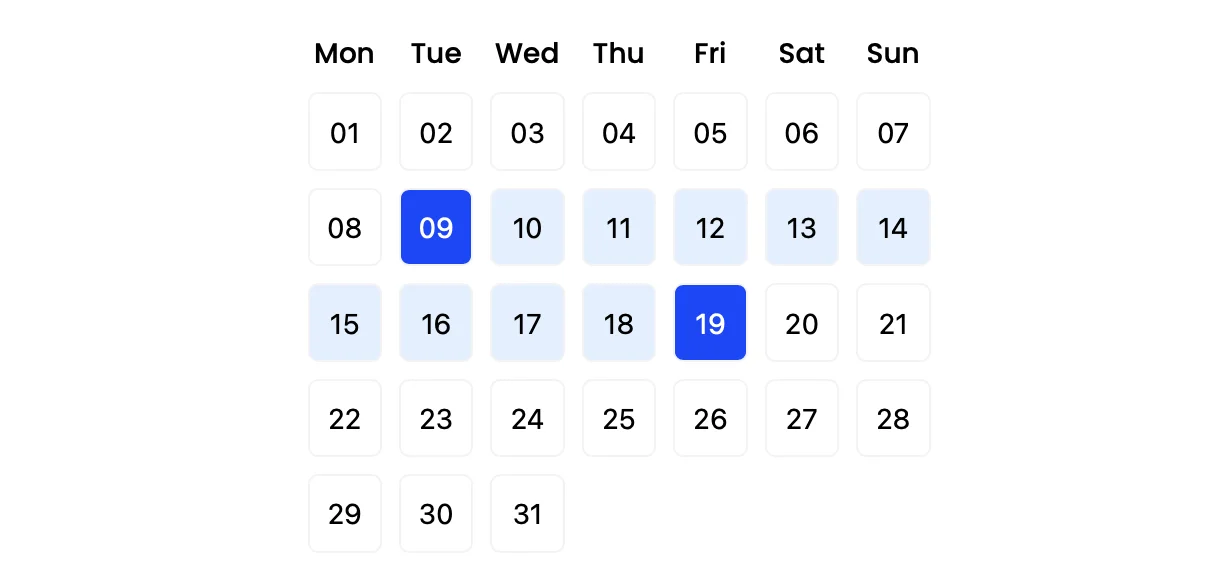
Range highlighting — that pale blue sweep across the dates between your selection points — might seem like it requires JavaScript to calculate which dates fall "between" the two selected ones. It doesn't. The CSS handles it with a single compound selector:
.isRangeSelected {
  :nth-child(1 of :has(:checked)) ~ :not(:nth-child(2 of :has(:checked)) ~ .date) {
    background-color: rgb(228 239 253);
  }
}
Breaking this down: the general sibling combinator (~) selects all .date elements after the first checked one. The :not() clause then excludes any .date that follows the second checked one. The intersection of those two conditions is precisely the dates that sit between the two selection points. No date arithmetic, no range calculation, no DOM manipulation for styling.
The .isRangeSelected class on the calendar container is toggled by JavaScript when two dates are checked — a minimal handoff that keeps concerns cleanly separated. CSS owns the visual state; JavaScript owns the interaction state.
Why This Architecture Matters Beyond the Demo
The broader principle here is worth internalizing: CSS selectors are a query language. Developers who treat them only as styling declarations miss half their power. The ability to select "the nth element matching a condition" is effectively a DOM query that browsers have optimized heavily. Offloading that work to CSS rather than JavaScript means less code to write, less to test, and better separation between interaction logic and presentation logic.
This approach also composes well. The calendar structure is just a list. The styling is pure CSS. The JavaScript is minimal and stateless — it queries the DOM rather than maintaining its own data structures. That means the component is easier to audit, easier to modify, and easier to integrate into frameworks that manage their own rendering cycles.
There are genuine constraints to acknowledge. The implementation handles a single month view; multi-month range selection (common in flight booking) would require more JavaScript to manage cross-month state. Accessibility needs attention — keyboard navigation and ARIA attributes for the selected range aren't covered in the base example and would need deliberate implementation for production use. And teams supporting browser versions predating 2023 would need a fallback strategy for the "n of selector" syntax.
The Dependency Question
Libraries like Flatpickr, Pikaday, and date-fns are mature, well-tested, and handle edge cases this approach doesn't — timezone handling, locale-aware formatting, disabled date ranges, minimum and maximum date constraints. For complex applications, they remain reasonable choices.
But for internal tools, simpler booking flows, or any project where bundle size and dependencies matter, the native CSS approach deserves serious consideration. A date picker built this way ships zero kilobytes of library code, has no peer dependencies to manage, and degrades gracefully — the checkboxes remain functional inputs even without the styling layer.
The "n of selector" syntax is one of those CSS features that, once you understand it, starts appearing as the right tool in places you'd previously reached for JavaScript. Date range selection is a compelling demonstration, but the same pattern applies anywhere you need to target elements by their position within a filtered subset: styled table rows, paginated card grids, conditionally highlighted list items. The browser already knows how to count — the question is whether you're letting it.
What the CSS-Tricks example ultimately demonstrates isn't just a clever trick for calendar UIs — it's a reminder that modern CSS has grown sophisticated enough to handle logic that developers reflexively delegate to JavaScript. As the "n of selector" syntax becomes more widely understood, expect to see it reshape how teams approach component architecture across a much wider range of UI patterns.